iWild Casino Mobile Australia: Browser Experience vs App
 Available in US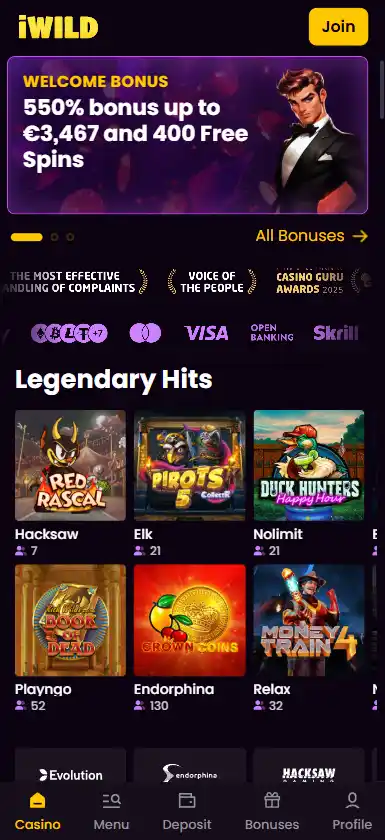
iWild supports mobile play through a responsive browser experience, and current evidence does not support a dedicated native iWild casino app in Apple’s App Store or Google Play. Instead, the practical mobile route is to open the casino website in Safari or Chrome and use it directly, with some sources also describing an installable PWA shortcut. That gives you an app-like icon without requiring a conventional store download.
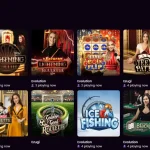
For most players, the important question is not whether there is an app icon but whether the mobile site gives access to the features they actually use. iWild’s browser version supports the core casino experience, including a large game library, live casino access and account functions, while 24/7 live chat provides a support route from mobile.
Table of Contents
- Does iWild have an iPhone or Android app?
- Mobile browser access is the main option
- PWA access can feel app-like without being a native app
- What can you do on iWild from a phone?
- Game discovery is more important than raw game count on a phone
- Live casino on mobile needs a stable connection
- Payments from mobile should be checked at the cashier
- Account setup is easier if you use one consistent device at first
- Mobile support is available around the clock
- Browser vs native app: which model is better?
- A short mobile compatibility checklist
- Frequently asked questions
- Recommend
Does iWild have an iPhone or Android app?
Current evidence points to browser-based access rather than a dedicated native gambling app for iOS or Android. Several current iWild reviews describe no native store app, and searches for iWild-branded casino software in the major app stores do not confirm an official real-money iWild casino application.
A similarly named Google Play game can appear in search results, but it is published by a different developer and describes itself as a reel-themed story game with no bets or purchases. It should not be confused with the iWild online casino.
For the broader brand picture, see the full iWild review. This distinction matters because an app-store logo or familiar name is not enough to establish that software belongs to the casino. If iWild later releases a native app, the safest way to identify it would be through a verified link from the casino itself and a matching publisher identity in the store.
Mobile browser access is the main option
iWild supports responsive browser play. In practical terms, that means the site adapts to a phone-sized screen rather than forcing users into a desktop layout. You can open the site in a modern mobile browser, sign in and navigate the casino without installing a separate program.
This model has a few advantages. There is no app-store update cycle to manage, no large download, and no need to give a separate app additional storage space. Changes to the casino interface can be delivered through the website itself.
The trade-off is that a browser experience depends more directly on the quality of your connection and on how well the website handles mobile navigation. A native app can sometimes integrate more deeply with the device, while a responsive site prioritises broad compatibility and immediate access.
PWA access can feel app-like without being a native app
Current third-party testing describes iWild as supporting a progressive web app, or PWA. A PWA can be added to a phone’s home screen and launched from an icon, but it is still fundamentally a web experience rather than software installed from the App Store or Google Play.
For a user, that can be a useful middle ground. The shortcut reduces the number of taps needed to return to the casino while avoiding the uncertainty of downloading an unofficial APK or similarly named app. It also keeps the experience tied to the same web account you use on desktop.
Because PWA behaviour can depend on browser and operating-system settings, the most reliable fallback is always the normal mobile website. If a home-screen shortcut stops working, opening the site directly in Safari or Chrome should still provide the core route.
What can you do on iWild from a phone?
| Mobile task | What the current evidence supports | What to check yourself |
|---|---|---|
| Browse casino games | iWild offers thousands of games and supports mobile browser play | Whether the specific title you want loads well on your device |
| Use live casino | Live dealer games are part of the wider iWild game offering | Streaming quality on your connection and screen size |
| Manage payments | Account and cashier functions are available through the web experience | Which deposit and withdrawal methods appear for your account |
| Contact support | Live chat is available 24/7 | Whether your issue needs escalation beyond the chat session |
| Use a home-screen shortcut | PWA-style access is described in current independent testing | How your browser handles installation and notifications |
The key limitation is that mobile access does not guarantee that every game, payment method or promotion will be identical for every account. Those are separate availability questions and should be checked in the relevant section of the site.
Game discovery is more important than raw game count on a phone
iWild offers thousands of casino games, but a large catalogue only helps on mobile if the interface makes it easy to narrow down. On a smaller screen, category navigation, search and provider filters matter more than seeing a huge total number.
If you mainly play pokies, the iWild games and pokies gives the broader library picture. On mobile, focus on whether your preferred titles load quickly, controls remain easy to tap and the game view fits comfortably in portrait or landscape mode.
Some games are naturally better suited to a phone than others. Simple slot controls usually need less screen space than multi-seat table layouts or games with dense side panels. A good mobile casino experience therefore depends as much on the individual game design as on the casino shell around it.
Live casino on mobile needs a stable connection
iWild includes live casino content, which can be accessed through the broader mobile web experience. Live dealer games are more demanding than ordinary slots because they stream video continuously while also displaying betting controls and table information.
If live games are a priority, test one session on your usual network before assuming the experience will match desktop. Wi-Fi quality, mobile data signal, device age and browser performance can all affect how smoothly the video runs.
The iWild live casino covers the live-dealer side in more detail. On a phone, the practical question is whether the table remains readable and responsive enough for the way you prefer to play.
Payments from mobile should be checked at the cashier
The mobile browser gives access to account functions, but payment availability can still vary by account and region. That means the set of buttons shown on a phone should be treated as the current list rather than assuming every method mentioned elsewhere will appear.
Before funding an account from mobile, check the currency, amount and payment route carefully. If the transaction sends you to a bank, wallet or authentication page, make sure the return to the casino is clear before repeating the payment.
The iWild payment methods covers AUD, cards, e-wallets, bank transfer and crypto in more detail. For withdrawals, remember that verification or payment-provider checks can add extra steps after the request is submitted.
Account setup is easier if you use one consistent device at first
For a new account, using the same phone and browser through registration, email confirmation and the first login can make the sequence easier to follow. It reduces the chance that you lose track of a confirmation page or switch between sessions while still setting up the account.
That does not mean you are locked to one device. A browser-based casino is specifically useful when you move between a phone, tablet and desktop. The account remains the same; only the screen and browser environment change.
If you are starting from scratch, the iWild registration explains the account setup steps and the information worth checking before depositing.
Mobile support is available around the clock
Live chat is available 24/7, which is particularly useful on mobile because it provides an immediate support route without leaving the device. If a game, payment or account screen behaves unexpectedly, you can open chat and describe the issue while it is still in front of you.
For technical problems, include the device type, browser and what you were trying to do. A concise description such as “Safari on iPhone, cashier does not return after bank authentication” is more useful than a general statement that the site is not working.
Do not share passwords, full payment credentials or unnecessary identity information in chat. If formal verification is required, use the account process provided for that purpose rather than sending sensitive material into a general support conversation.
Browser vs native app: which model is better?
| Factor | Mobile browser/PWA | Native app |
|---|---|---|
| Installation | No store download required; PWA shortcut may be available | Installed through an app store or official package |
| Updates | Website changes appear automatically | May require store updates |
| Storage | Usually lighter on device storage | Uses dedicated app storage |
| Access | Works through a modern browser on multiple devices | Depends on supported operating systems |
| iWild today | Supported | No dedicated native casino app confirmed |
For iWild, the browser model is not a fallback after a missing app. It is the main mobile product. Whether that is a disadvantage depends on what you value. If you want immediate access and no installation, it is straightforward. If you strongly prefer a store-listed native application, iWild does not currently meet that preference.
A short mobile compatibility checklist
- Use a current version of Safari, Chrome or another mainstream browser.
- Test login and account navigation before making a deposit.
- Open one of your preferred games and check touch controls in both portrait and landscape if supported.
- For live casino, test video stability on the network you normally use.
- Confirm the cashier shows the payment methods and currency you expect.
- If using a home-screen shortcut, remember that it is web-based rather than a native store app.
- Use the verified casino route rather than downloading an unrelated APK or similarly named application.
This checklist is more useful than choosing a casino because it advertises “mobile compatibility” in general. The question is whether the parts you personally use – games, cashier, account and support – work comfortably on your device.
Frequently asked questions
Does iWild have an iOS app?
No dedicated native iWild casino app is currently confirmed in Apple’s App Store. Mobile browser access is the main route.
Does iWild have an Android app?
No dedicated native iWild casino app is currently confirmed in Google Play. Current sources instead support browser and PWA-style access.
Can I play iWild games on a phone?
Yes. iWild supports responsive mobile browser play and offers thousands of casino games.
Can I use live casino on mobile?
Live casino is part of iWild’s wider game offering. The practical experience depends on device performance, screen size and connection quality.
Is live chat available on mobile?
Yes. iWild’s live chat is available 24/7 and can be reached from the web experience.